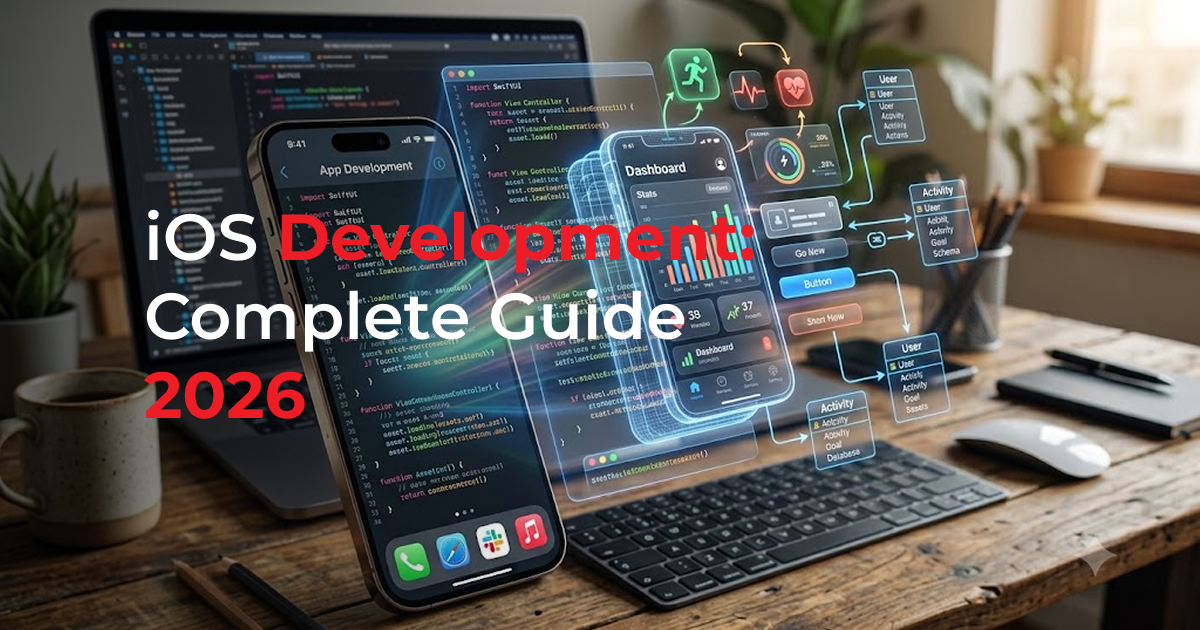
Whether you are a complete beginner or an experienced developer transitioning to Apple’s ecosystem, this iOS app development guide walks you through every step, from setting up XCode to publishing your first app on the App Store. The iOS platform reached 1.5 billion active devices in 2026, making it one of the most rewarding environments for mobile development worldwide.

1. What Is iOS App Development?
iOS app development is the process of creating software applications that run on Apple’s mobile operating system, powering iPhones, iPads, and iPod Touch devices. It combines programming, UI/UX design, and App Store optimization into a single discipline.
Modern iOS development is centered on two core technologies:
- Swift — Apple’s fast, expressive programming language (current version: Swift 6)
- Xcode — Apple’s integrated development environment (IDE) with a visual simulator and code editor
- SwiftUI — Apple’s declarative UI framework for building adaptive interfaces with less code
- UIKit — The proven imperative framework, still widely used in enterprise and legacy apps
2. Essential Tools & Requirements for iOS Development in 2026
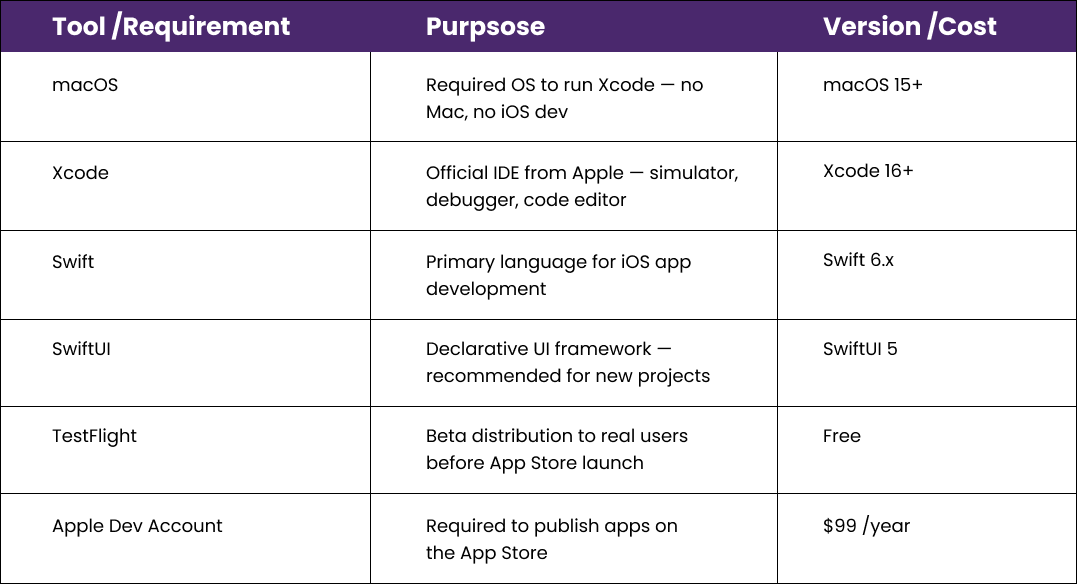
Before writing your first line of Swift, ensure your development environment is correctly configured. Below is every tool you need to get started with iOS development in 2026.

3. How to Learn Swift for iOS Development Fast
Swift is designed to be learner-friendly while remaining powerful enough to build enterprise-grade applications. Here is the recommended learning path to become productive with Swift in 2026.
Core Swift Concepts to Master First
- Variables, constants, data types, and Swift optional
- Functions, closures, and higher-order functions
- Object-Oriented Programming: classes, structs, enums, and protocols
- Concurrency with async/await, actors, and structured concurrency (Swift 6)
- Error handling using Result types, do-catch, and throwing functions
- Memory management: ARC (Automatic Reference Counting) and weak references
Best Free Learning Resources in 2026
- Apple’s official Swift documentation at swift.org
- Stanford CS193p — free iOS development course on YouTube (updated annually)
- Hacking with Swift — 100 Days of SwiftUI (project-based curriculum)
- Swift Playground — Apple’s interactive iPad and Mac learning environment
4. Step-by-Step: Build Your First iOS App in 2026
Follow this structured 6-step process to go from a blank Xcode project to a fully functional iOS application ready for distribution.
1. Plan Your App Idea
Define your app’s core purpose, target audience, key features, and user flow before touching code. Sketch wireframes on paper or use Figma.
2. Set Up Xcode Project
Open Xcode, create a new project, select SwiftUI as the interface, configure your Bundle Identifier, and set the minimum iOS deployment target.
3. Design the UI with SwiftUI
Build your interface using declarative SwiftUI views. Use the live Xcode Canvas preview to iterate quickly without needing to rebuild each time.
4. Add Business Logic
Implement your app’s functionality: data models with Swift structs, networking with URLSession or Alamofire, and state management using @State and @ObservableObject.
5. Test on Simulator & Real Device
Use the Xcode Simulator across multiple device sizes, then test on a physical iPhone to verify performance, gestures, and real-world battery behavior.
6. Submit to the App Store
Archive your app in Xcode, upload via Xcode Organizer, complete all App Store Connect metadata, add screenshots, and submit for Apple’s review (typically 24–48 hours).
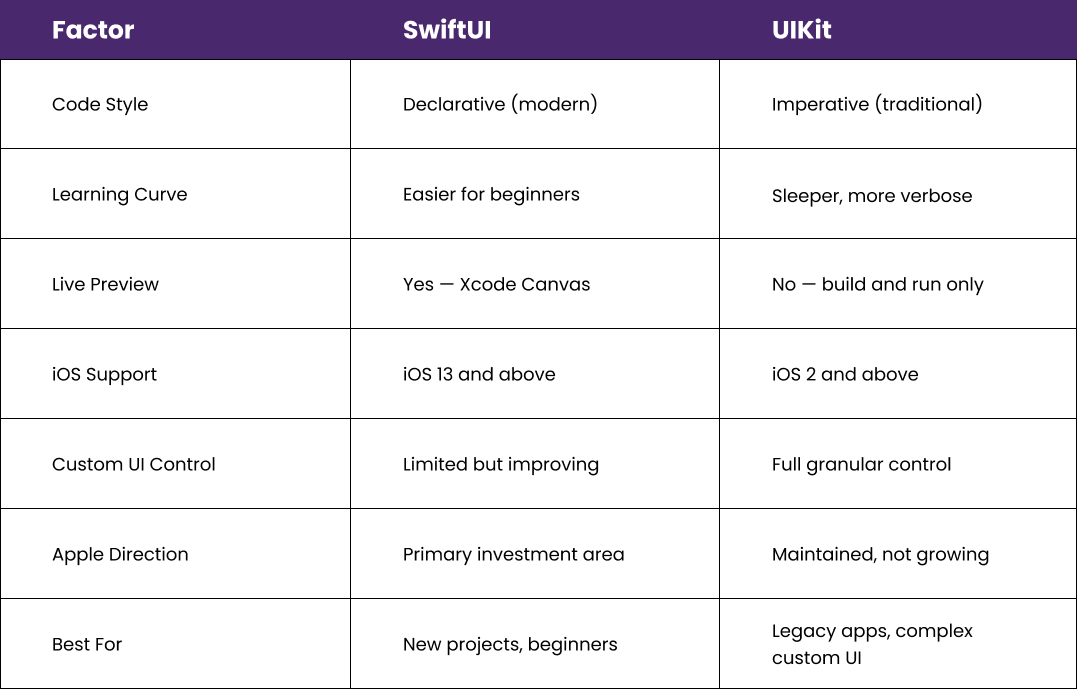
5. SwiftUI vs UIKit: Which Framework to Choose?
Choosing the right UI framework is one of the first major decisions in iOS development. Here is a side-by-side comparison to help you decide for your 2026 project.

6. App Store Submission: Complete Checklist
Apple’s App Store review team evaluates dozens of criteria before approving an app. Use this checklist to avoid rejection and ensure a smooth first-time submission.
Required Assets
- App icon: 1024 x 1024 px PNG, no transparency, no rounded corners (Apple adds them)
- Screenshots for all required device sizes: iPhone 6.7″, 6.1″, and 12.9″ iPad
- App preview video (15–30 seconds) — optional but significantly boosts conversions
Metadata & Legal
- Privacy Policy URL – mandatory since iOS 10 for all apps
- App name (max 30 characters) – include primary keyword naturally
- Subtitle (max 30 characters) – second keyword placement opportunity
- Description – first 252 characters are visible without tapping “More”
- Keyword field – exactly 100 characters of comma-separated search terms (no spaces after commas)
- Age rating questionnaire – complete accurately to avoid misclassification
Technical Requirements
- No placeholder content, Lorem Ipsum text, or broken links anywhere in the app
- All features accessible – no locked features that require external hardware to test
- App tested on a real physical device, not only on the Simulator
- Privacy manifest file (PrivacyInfo.xcprivacy) – required as of 2024 for all apps
7. iOS App Monetization Strategies That Work in 2026
Choosing the right monetization model is as critical as building a great product. Here are the four proven strategies generating the most revenue for independent iOS developers in 2026.
1. Freemium + In-App Purchases
Offer core features for free and gate premium functionality behind one-time or consumable in-app purchases. This model drives the highest download volume while maintaining strong revenue potential through StoreKit 2’s flexible purchase options.
2. Subscription Model (Highest LTV)
Apple heavily promotes subscription apps through editorial features. Recurring subscriptions via StoreKit 2 offer the most predictable revenue stream and the highest lifetime value (LTV) per user. Offer weekly, monthly, and annual plans with a free trial to maximize conversions.
3. One-Time Purchase (Paid App)
Best for professional tools with a clear, immediate value proposition. Works well for niche audiences willing to pay upfront for a complete, self-contained solution. Combine with free updates to build long-term user trust and word-of-mouth growth.
4. In-App Advertising
Integrate ad networks like Google AdMob or Apple’s own SKAdNetwork within free apps. Most effective for high-volume, engagement-driven apps such as games, utility tools, and content readers where daily active usage is strong.
Frequently Asked Questions About iOS App Development
These are the most common questions from developers starting their iOS journey in 2026, each answered concisely and accurately.
Q. What programming language is used for iOS app development?
A. Swift is Apple’s primary and officially recommended language for iOS app development in 2026. Introduced in 2014 and now on its sixth major version, Swift is fast, safe, and far easier to read than its predecessor, Objective-C. While Objective-C is still fully supported, all new iOS projects should use Swift.
Q. How long does it take to learn iOS app development from scratch?
A. With 1–2 hours of focused practice daily, most beginners can build a functional iOS app within 3–6 months. Reaching a professional level capable of building complex networked apps with proper data persistence, animations, and App Store optimization typically takes 12–24 months of consistent hands-on development.
Q. Do I need a Mac to develop iOS apps?
A. Yes. Xcode, Apple’s official IDE for iOS development, only runs on macOS. A Mac is required to write Swift code, run the iOS Simulator, test on a physical iPhone, and submit apps to the App Store. Cloud-based Mac services like MacStadium or GitHub Actions macOS runners are available alternatives if you do not own a Mac.
Q. How much does it cost to publish an iOS app on the App Store?
A. Publishing on the App Store requires an Apple Developer Program membership at $99 per year (USD). This fee covers unlimited app submissions under your account, access to beta testing through TestFlight, and access to all Apple developer tools and documentation. There are no per-app fees beyond the annual membership.
Q. What is the best UI framework for iOS development in 2026 – SwiftUI or UIKit?
A. For new iOS projects targeting iOS 16 and later, SwiftUI is the recommended framework in 2026. It requires significantly less code, offers live preview in Xcode Canvas, and receives the most investment from Apple. UIKit remains essential for maintaining existing codebases, achieving fine-grained UI control, or targeting older iOS versions below iOS 13.
Q. Is cross-platform development (Flutter or React Native) better than native iOS?
A. It depends on your goals and target platforms. Native Swift development delivers the best performance, deepest Apple ecosystem integration, and the highest-quality user experience on iOS. Cross-platform frameworks like Flutter or React Native are ideal when you need to ship simultaneously on iOS and Android with a shared codebase. For premium iOS-first products, native development is always the stronger choice.
Start Your iOS Development Journey Today
You now have a complete iOS app development guide for 2026 – from understanding the basics of Swift and Xcode to shipping and monetizing your app on the App Store. The most important step is simply to start. Open Xcode, create your first project, and build something.
Ready to Turn Your App Idea Into Reality?
Whether you’re building your first iOS app or planning a feature-rich business application, having the right development partner can make all the difference. Our experienced iOS developers specialize in creating high-performance, scalable, and user-friendly apps using the latest Swift and SwiftUI technologies. Contact us today to discuss your project and bring your vision to the App Store with confidence.