

You launched your app. Now what? Most founders don’t think seriously about maintenance costs until something breaks, usually at the worst possible moment.
App maintenance isn’t a one-time expense. It covers security patches, OS updates, bug fixes, performance work, and feature development. Miss-budgeting for it is one of the more reliable ways to watch an otherwise-good app slowly deteriorate.
This guide breaks down every component of maintenance costs in 2026, gives you real numbers, and helps you build a budget that won’t blow up on you.
| Over 60% of app developers underestimate maintenance costs at launch, which leads to budget overruns and degraded performance within the first year. |
Table of Contents
Understanding App Maintenance Costs
What Is App Maintenance?
App maintenance covers everything required to keep a mobile or web application functional, secure, and current after launch. That includes fixing post-release bugs, shipping new features, staying compatible with the latest OS versions, and keeping third-party integrations from quietly breaking.
Think of it like maintaining a car. Regular service keeps it running. Skip it long enough and you’re looking at a breakdown at exactly the wrong time.
| A useful rule of thumb: maintenance runs 15-20% of your original development cost per year. Built the app for $100,000? Budget $15,000-$20,000 a year just to keep it in working order. |
Why Regular Updates Are Non-Negotiable
Updates do more than patch bugs. Here’s what’s actually at stake:
- Security compliance: Apple and Google update their security standards regularly. Apps that fall behind get removed from the store.
- OS compatibility: iOS and Android ship major updates every year. Without maintenance, your app starts crashing on new devices.
- User retention: Research consistently shows regular updates lift retention rates, users stay with apps that keep improving.
- Performance: New hardware and updated libraries mean real gains in speed and stability, which feeds directly into app store rankings.
- Competitive relevance: The app market doesn’t sit still. Regular updates are how you avoid becoming the outdated option.
Common Myths About Maintenance Costs
A few assumptions that reliably cost people money:
- “My app is finished – I’m done paying.” Post-launch costs often exceed 50% of total lifetime app spend.
- “Maintenance is just bug fixes.” It also includes security updates, server costs, API changes, content updates, and performance monitoring.
- “Cross-platform apps are cheaper to maintain.” Development is faster, but React Native and Flutter apps still require platform-specific testing and updates.
- “My developer will handle everything for free.” Post-launch support is almost always a separate contract.
Factors That Drive Maintenance Costs
No two apps cost the same to maintain. Here’s what actually moves the needle.
App Complexity
This is the biggest cost driver, by far. Complexity breaks down into:
- Number of features and screens: More features mean more code, more failure points, and longer update cycles.
- Backend architecture: Apps with microservices, ML models, or real-time data processing need specialized expertise that costs more.
- Third-party integrations: Every API you connect to, payments, social logins, maps, analytics, adds a dependency that needs monitoring. When the third party changes their API (and they will), you pay someone to update yours.
- Database complexity: As data grows, you need performance tuning, backup strategies, and migration work.
| For every 10 third-party API integrations in your app, budget an extra $1,000-$3,000/year just for compatibility maintenance. |
Platform: iOS vs. Android
Platform choice affects ongoing costs more than most people realize.
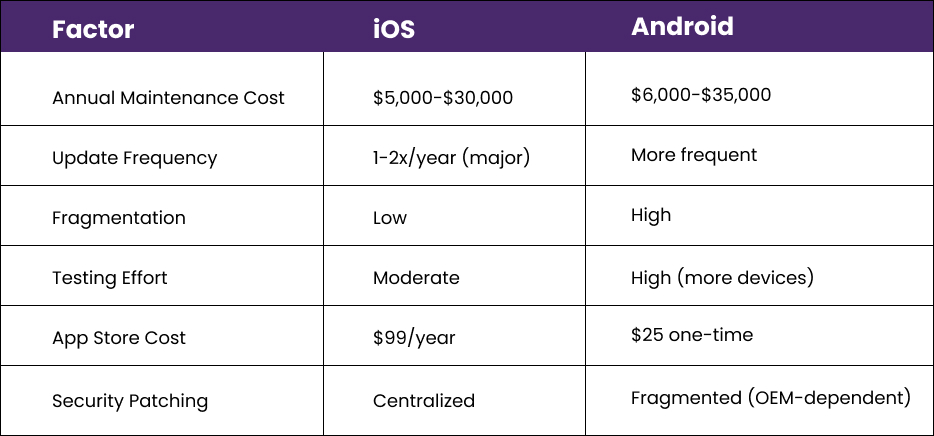
Maintaining both iOS and Android natively roughly doubles your platform costs. Cross-platform frameworks like Flutter or React Native can cut that, but typically by 30-40%, not more.
| Android fragmentation – thousands of device and OS combinations – makes testing significantly more complex than iOS, where Apple controls the full hardware-software stack. |
Update Frequency
How often you ship updates directly drives your annual spend. A typical cadence:
- Critical bug fixes and security patches: As needed, often within 24-72 hours of discovery
- Minor updates (UI tweaks, small features): Monthly or bi-monthly
- Major releases: Quarterly or bi-annually
- OS compatibility updates: Aligned with Apple/Google release schedules, typically in the fall
Higher frequency costs more. It also produces better retention and app store performance, so it’s not pure overhead.
What App Maintenance Actually Costs in 2026
Here are current market benchmarks, broken down by app type and maintenance component.
Annual Costs by App Type
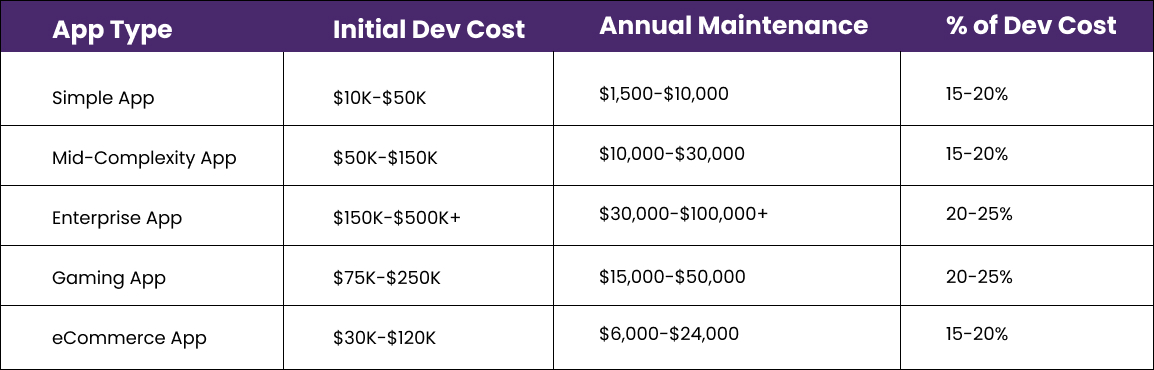
| Simple apps can easily exceed $10,000/year once you add hosting, SSL certificates, OS updates, and basic bug fixes. |
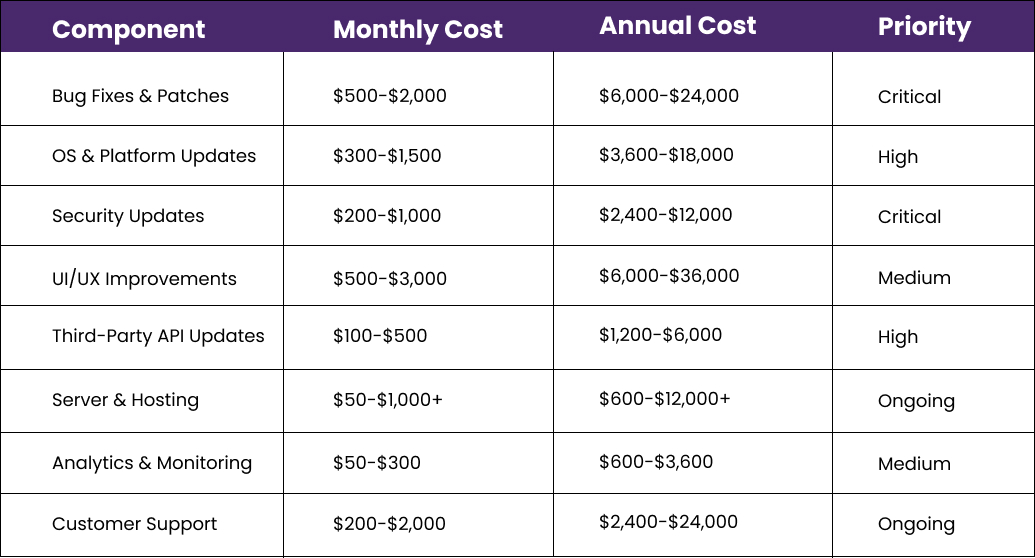
Cost Breakdown by Maintenance Component
Hourly Rates vs. Monthly Retainers
Most agencies and freelancers offer two models:
Hourly Rate Model
- Junior Developer: $25-$75/hr (offshore) | $75-$120/hr (US/Europe)
- Mid-Level Developer: $50-$100/hr (offshore) | $100-$150/hr (US/Europe)
- Senior Developer: $80-$150/hr (offshore) | $150-$250/hr (US/Europe)
Works best for ad-hoc maintenance or smaller apps with minimal ongoing changes.
Monthly Retainer Model
- Basic (10 hrs/month): $500-$1,500/month
- Standard (20-40 hrs/month): $2,000-$6,000/month
- Dedicated team (80+ hrs/month): $8,000-$25,000/month
Better for apps with frequent updates, growing user bases, or complex infrastructure.
| For most small-to-mid-sized apps, a 15-20 hour monthly retainer hits the right balance between cost and responsiveness. Whatever you agree to, make sure the contract includes an SLA with guaranteed response times for critical fixes. |
Maintenance Costs by Industry
- Healthcare (HIPAA compliance): $20,000-$80,000/year – Regulatory compliance, data encryption, and audit trails add substantial overhead.
- Fintech / Banking: $30,000-$100,000+/year – PCI-DSS compliance, fraud detection updates, and security audits drive high costs.
- eCommerce: $8,000-$30,000/year – Seasonal traffic spikes, payment gateway updates, and catalog changes need regular attention.
- Social Media / Community: $15,000-$60,000/year – Content moderation, notifications, and real-time features require constant maintenance.
- On-Demand / Marketplace: $20,000-$75,000/year – Complex two-sided logic, map integrations, and payment splits need careful upkeep.
Building Your Maintenance Budget
A Step-by-Step Estimation Framework
Use this to get to a realistic annual number:
- Start with your development cost. That’s your baseline input.
- Apply the 15-20% rule. Multiply your dev cost by 0.15-0.20 for a baseline maintenance figure.
- Add platform costs. $99/year for the Apple Developer Program; $25 one-time for Google Play.
- Add server and hosting costs. Ranges from $50/month for small apps to $5,000+/month for high-traffic ones.
- Add compliance costs. If you’re in healthcare or finance, add 10-15% for regulatory overhead.
- Add a 20% contingency buffer. Emergency patches and unplanned features happen. Budget for them now.
| Example: App built for $80,000 → Baseline: $12,000-$16,000 → Server costs: $2,400/year → Platform accounts + SSL: $200/year → Contingency (20%): ~$3,000-$3,700 → Total: roughly $17,500-$22,300/year |
Useful Tools for Tracking Maintenance Costs
- Jira or Linear: Track bugs, features, and sprint costs to see where maintenance hours actually go.
- Datadog or New Relic: Application performance monitoring that catches problems before they become expensive emergencies.
- Firebase Crashlytics: Free crash reporting to prioritize which bugs to fix first.
- AWS Cost Explorer or Google Cloud Console: Monitor and optimize cloud spending.
- Notion or Airtable: Build a simple maintenance budget tracker to compare actuals against estimates each quarter.
How to Price Maintenance (For Agencies and Freelancers)
If you’re on the selling side:
- Calculate your fully loaded hourly cost (salary, benefits, overhead) and mark up 2-3x.
- Offer tiered packages (Basic, Professional, Enterprise) to fit different client budgets.
- Define scope explicitly – spell out what is and isn’t included in the monthly fee to avoid scope creep.
- Build in quarterly review clauses so you can adjust pricing as the app grows.
- Charge 1.5-2x for after-hours emergency fixes. Your team’s time has a value.
Best Practices That Actually Reduce Long-Term Costs
Smart maintenance is about where you spend, not just how much.
Proactive Performance Monitoring
Catching bugs before users report them is dramatically cheaper than firefighting after the fact.
- Set up real-time crash reporting (Firebase Crashlytics, Sentry) from day one.
- Monitor Core Web Vitals and load times with New Relic or Datadog.
- Track API response times and error rates to catch third-party issues early.
- Use uptime monitoring (Pingdom, Better Uptime) with instant alerts.
- Review performance analytics monthly – screen abandonment spikes are often the first sign of a UX problem.
| Apps that go 90+ days without updates see significantly higher uninstall rates, especially on Android. |
Using User Feedback Properly
Your users notice problems your monitoring tools miss. Build a feedback loop:
- Implement in-app feedback tools (Instabug, Apptentive) to collect qualitative reports and feature requests.
- Check app store reviews daily – negative reviews often surface bugs before your alerts do.
- Use session recording (FullStory, UXCam) to watch real user sessions and find friction.
- Run quarterly user surveys to gauge sentiment and prioritize the backlog.
- Maintain a public changelog or roadmap – it builds trust and reduces support volume.
Choosing the Right Maintenance Team
The team you pick matters more than almost anything else in your maintenance strategy.
- Original development team: First choice, always. They know the codebase. Negotiate a post-launch support contract before the project ends.
- Specialized maintenance agencies: Good when the original team isn’t available. Look for agencies with documented code review processes.
- Freelancers: Cost-effective for smaller apps, but riskier. Make sure the code is well-documented before handover.
- In-house developer: Best for apps with high update frequency or strategic importance. Higher fixed cost, faster response.
| When switching maintenance teams, insist on comprehensive technical documentation and a proper code handover. Poor documentation is one of the most consistent causes of cost overruns when onboarding a new team. |
Frequently Asked Questions
What are the average annual app maintenance costs?
The baseline is 15-20% of original development cost. A $50,000 app runs $7,500-$10,000/year. Enterprise apps with complex infrastructure can reach $50,000-$100,000+ annually. Hosting, security updates, OS compatibility, and bug fixes are the main drivers.
How much does it cost to update an app?
Minor updates (small bug fixes, UI tweaks): $500-$3,000. Medium updates (new features, API changes): $3,000-$15,000. Major version overhauls: $15,000-$50,000+. Cost depends heavily on complexity, hourly rate, and how well-documented the codebase is.
What factors affect maintenance cost the most?
App complexity and feature count, platform (iOS, Android, or both), update frequency, where your development team is located, regulatory compliance requirements, and how well the app was originally architected. Poor initial architecture is often the biggest hidden cost multiplier.
How do I estimate my maintenance costs?
Apply the 15-20% rule to your development cost for a baseline. Add server and hosting costs, platform developer account fees, third-party API subscriptions, and a 20% contingency buffer. If you’re in a regulated industry, add 10-15% for compliance overhead.
What should I charge for app maintenance?
A common agency approach: 15-20% of the original project cost annually. For tiered monthly retainers: Basic at $500-$1,500/month (10 hrs), Standard at $2,000-$5,000/month (30-40 hrs), Premium at $8,000+/month for dedicated support. Define scope clearly in the contract.
Is iOS or Android cheaper to maintain?
iOS is generally slightly cheaper due to Apple’s controlled ecosystem and fewer fragmentation issues. Android requires broader testing across more devices and OS versions, increasing QA costs. The difference is typically 10-20% , not enough to make platform choice purely a cost decision.
How much does maintenance cost for a large-scale app?
Apps with 100,000+ monthly active users typically need $2,000-$10,000/month in infrastructure alone. Add development costs and total spend can reach $60,000-$300,000+ annually, depending on complexity, uptime requirements, and update cadence.
Final Thoughts: Budget for Maintenance Before You Launch
App maintenance costs are a strategic question, not just a finance one. The apps that last are usually backed by owners who planned for maintenance from the beginning rather than treating it as an afterthought.
The key points to take away:
- Budget 15-20% of your initial development cost for annual maintenance. It’s an industry standard for a reason.
- Factor in platform costs, server infrastructure, third-party APIs, and compliance on top of developer fees.
- Invest in proactive monitoring. Catching bugs early costs a fraction of fixing them in production.
- Choose your maintenance team carefully. Technical documentation, clear SLAs, and relevant expertise matter as much as cost.
- Revisit your budget quarterly as your user base and feature set grow.
Whether you’re a founder planning your first app or managing a portfolio of products, a realistic maintenance budget is what separates apps that grow from apps that quietly fade out after launch.
Need help estimating your specific costs? Use the framework in this guide to build your budget, or get a quote from a qualified development agency.
